|
|
| the writing workshop |
 |
 |
 |
 |
 |
 |
|||||||||||
Home |
User's guide |
Plan |
Application |
F.O.P |
Additional resources |
|||||||||||
Researching for writing |
 |
collecting the relevant information |
|
Locating the source material |
|---|---|---|---|---|
|
Evaluating the source material | |||
|
|
Locating the source materialHow do you go about finding or locating the sources you need? There are two different situations that you might find yourself in. Sometimes your lecturer will provide you with a list of references for the essay or assignment. They might be assumed to be the complete set of readings that you require, or more often, perhaps, they are assumed only to provide you with a good starting point. If you have been given a list of references, you can then check the catalogue of your library (for example, UNSW Library Search) to find them. Alternatively, you might not have been given a list of references. Your lecturer might want you to locate the set of references for your essay or assignment. In this case, you will need to consult various sources in order to get started. Each type of source will have a different usefulness. Let’s consider some of the most important ones.
DatabasesUsing a database is the best way to find articles from periodicals, journals or serials (publications that appear on a regular, continuing basis). Most "library databases", as they are now known, are now available via the Web. Some of them contain only summaries of the articles while others contain the full text of the article. In general, access to databases is not free; libraries must subscribe or pay to use them. It is for that reason that "Google" or similar internet search engines do not provide access to this material. Most university libraries (including UNSW) have access to a large number of databases. It can therefore be difficult to know where to start. The best starting point for UNSW staff and students is to go to the UNSW Library Homepage and access the UNSW Library Database. Here you will be able to Find Database covering various ranges of topics or to select Subject Guides for a suggested database and other resources in your subject area. If you know the name of the database you want to use, for example, Web of Science or PsycINFO, select it from the list of databases in the Find Database window to begin searching that database. If you don’t know which database to use, select a subject area (for example, Science or Psychology) from the choices in Subject Guides. Alternatively, your lecturer or a librarian may suggest a suitable database or subject guide.
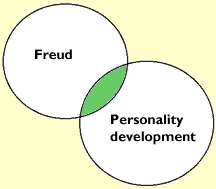
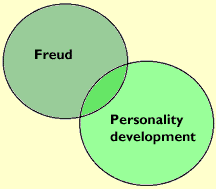
Web of ScienceThis example identifies the principles of specifying topics and keywords and of combining these. These principles are the same for using any database. They can therefore guide your use of databases in all discipline and subject areas. Imagine that you are searching for source material on the following essay question, In his theory of personality development, how did Freud assume the personality differences between boys and girls come about? You need to have identified the broad topic area and its specific components. Once you have done this, you can use the keywords to search for references that are relevant to the essay question. Below is an example of a search on this topic area. We have provided you with some important information about the steps involved in undertaking your search, important things to keep in mind, and some useful terminology. You might like to copy the steps in this search, or conduct your own search along a similar line. The keywords that are important in the above essay question are personality development, Freud, and sex differences in personality. You can use these words to conduct a search. Conducting searches using each of these keywords separately will result in multiple sources being identified. You can narrow or broaden your search using the advanced search option. This option allows you to use AND and OR during your search. For eaxmple, if you want to combine search terms such as personality development and Freud, you need to use AND. When personality development is combined with Freud using the AND function, only those articles including personality development and Freud will be located. The AND key narrows a search by requiring the occurrence of both terms. The OR key broadens a search by allowing for the occurrence of one term or another.
Limiting your search. You may wish to limit your search using the word NOT in the advanced search.You can search for the key words in title or subject. You can also limit your search according to publication date. When you have found an author who has published on the topic area you are interested in, it can be useful to conduct a search by author. Locating the articles identified in your search. Use the UNSW Library Search to find the call numbers of the journals the articles are published in, locate the journals on the shelf, and find the article within the journal. If the article you have found is available in the electronic form you can print it directly from your computer. What to do if a journal is not on the shelf. Generally an empty space on the shelf suggests that the journal may be on a sorting shelf, having been used by someone a short time before. Check the sorting shelves especially near the photocopiers. How to find out if the journal is held at another library. You can access other library catalogues through the UNSW library home page. Under Borrowing , find the link for Interlibrary Loans and click on it. When the result of your search is a dissertation. Dissertations are theses written by students internationally. The University holds some dissertations, but the majority of dissertations listed in databases are international and must be ordered in. It usually takes about six weeks for a thesis to arrive. You will find that for undergraduate purposes, ordering a dissertation is not necessary. The meaning of prefixes on the call numbers and where to locate them. The library catalogue identifies various locations by using prefixes such as S for Social Sciences and Humanities Library, MB for Biomedical Library, P for Physical Sciences Library and usually indicates which floor this material can be found on.
|
|
|
|
|
|
|
|||||||||||
Home |
User's guide |
Plan |
Application |
F.O.P |
Additional resources |
|||||||||||
|
Last updated
September 12, 2016
|